Image Feature Detection & Captioning
Transformer
More coherent captions
LSTM
Recurrent baseline
Attention
Inspectable focus
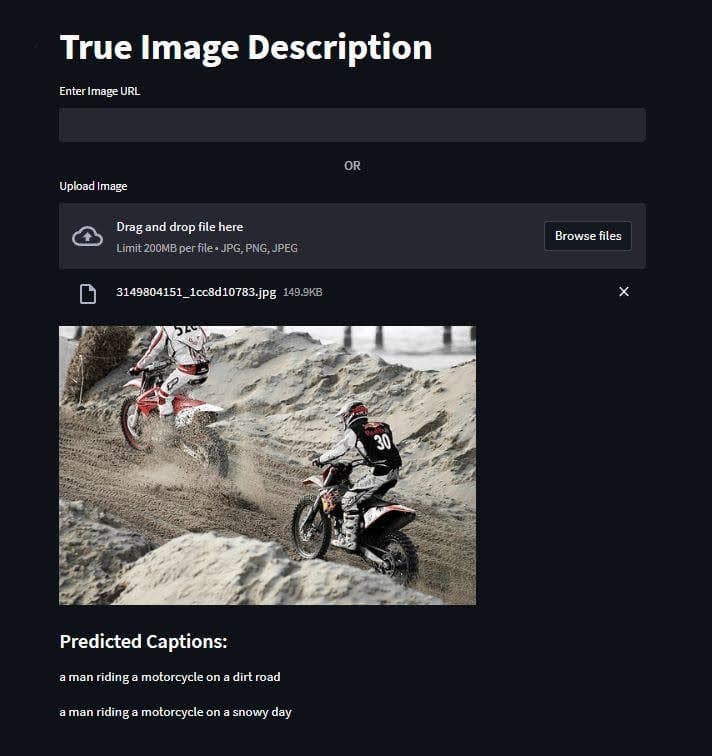
Trained a CNN-based image-captioning pipeline and compared LSTM and Transformer decoders. Built a Streamlit UI so you can try the resulting captions yourself.
Preview
Why I built it
I wanted to build something that could look at an image and describe what's in it. The idea was straightforward, but getting it to actually work well took some effort.
How it works
I used VGG-16 as the image encoder to extract feature vectors, then fed those into two different decoders: an LSTM and a Transformer with attention. I wrapped the whole thing in a Streamlit app so you can upload any image and get a caption back in a few seconds. It's a simple UI, but it makes the model feel real instead of just numbers in a notebook. The hardest part was honestly the training pipeline. VGG-16 is memory-hungry, the Transformer needed careful hyperparameter tuning, and I spent more time on data preprocessing than I'd like to admit.
Decoder comparison
The LSTM provided a useful recurrent baseline, while the Transformer produced more coherent, context-aware captions in qualitative comparisons. Its attention mechanism also made it easier to inspect which image features influenced each generated token.
Key features
Advanced AI Models
VGG-16 for image feature extraction, then LSTM and Transformer decoders for generating captions
Decoder Comparison
Compared a recurrent LSTM baseline with a Transformer whose attention produced more coherent captions
User-Friendly Interface
Streamlit app where you upload an image and get a caption back in seconds
Real-time Processing
Tuned the pipeline so inference runs fast enough to feel instant
Technical stack
Friction & takeaways
Friction
- The Transformer gave better captions but was noticeably slower, had to find the right size/speed tradeoff
- The model struggled with unusual image compositions that weren't well represented in training data
- The LSTM needed extensive hyperparameter tuning before I moved to the Transformer architecture
- Making the Streamlit UI responsive enough that it didn't feel like you were waiting forever
- VGG-16 is memory-hungry, had to be strategic about batch sizes during training
Takeaways
- Transformers really do outperform LSTMs on sequence tasks once you get the training right
- Connecting a vision encoder to a language decoder is tricky, the feature vector interface matters a lot
- Attention maps are useful for debugging, not just for boosting scores
- Even a simple Streamlit UI makes a model way more convincing in a demo
- Automatic caption metrics do not always match how natural or accurate a caption reads